FACEIT Version only
This menu targets the FACEIT client and its anti-cheat. It is not the standard CS2 public or Premier build. Buy the version that matches where you queue.
This build is the FACEIT Version only. It is meant for FACEIT anti-cheat lobbies, not standard Valve matchmaking or Premier. This Windows menu covers smooth aim, FOV control, bone selection, visible check, player ESP, skeleton, box, health, radar, config save and load, hotkeys, and a stream-proof overlay. Plans and checkout are on the Price page. Monthly and lifetime options include instant digital delivery. Check Status before checkout.
Checkout
GREENCurrent build is listed under GREEN.Five months at $35 each is $175. Lifetime is $150 once.
BUYDigital delivery. Same menu on both plans.
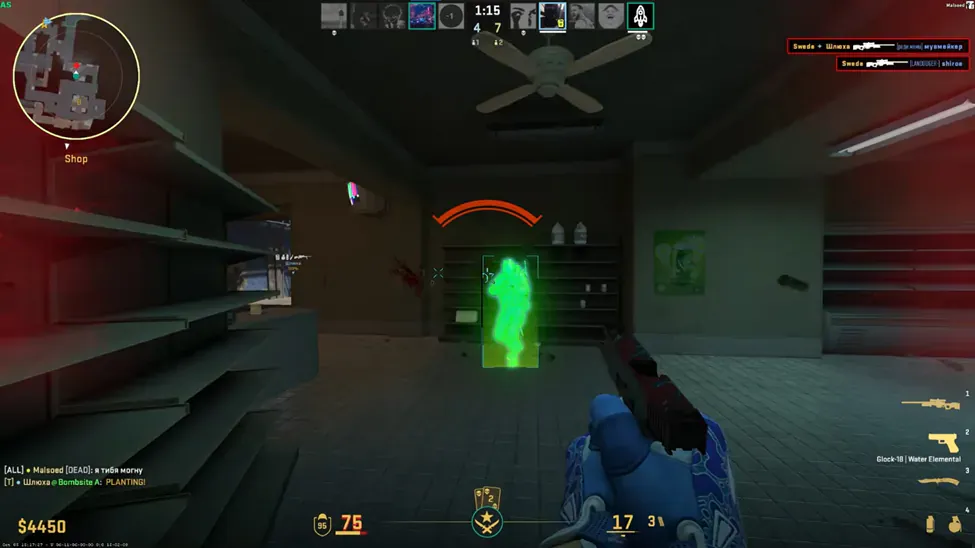
In-game screenshots from CS2 with ESP and radar enabled. Swipe or use the arrows to browse.
1 / 7
What you are buying, what the label covers, and where to read next.
FACEIT Version only
This menu targets the FACEIT client and its anti-cheat. It is not the standard CS2 public or Premier build. Buy the version that matches where you queue.
One menu, both prices
Aimbot, player ESP, radar, misc, and the stream-proof overlay sit in the same build. Monthly is fine for a first run. Lifetime is the better deal if you keep playing past a few months.
Only what is listed
If a switch is not named on this page, it is not in the menu. The feature pages explain each one.
Check Status first
GREEN means you can load. RED means wait. A patch can change the label even if your key is still valid.
The Status page is the current label. The purchase card shows the same label.
See pricingGREEN
Current build is listed under GREEN.
What the label is not
GREEN is not a promise the light stays GREEN after the next patch, and it says nothing about your account. The buyer's guide covers the risk of using cheats.
Four modules on one menu. The stream-proof overlay is meant to stay out of supported capture setups. Open a module page for sections, FAQs, and control detail.
All features comparedTurn it on, set how wide it looks and how fast it moves, then pick a bone. Visible check keeps picks on targets you can actually hit.
Master switch plus box, skeleton, and health so you only draw what you can read in a round.
A top-down panel around you so you catch flanks before someone appears on screen.
Save and load configs, set hotkeys, and keep the overlay off your stream or recording.
Monthly and lifetime include all 13 published controls. Tap a name to jump to that control on the module page.
Match the line before you pay. Lifetime does not widen the list.
Published requirements
Listed as supported
Not on the requirements line
Monthly and lifetime plans are listed on the Price page with instant digital delivery.
Checkout is digital. The delivery note has the loader. The menu opens with Insert unless the note says otherwise.
Fresh install threadOpen the Status page before you pay and again before you load. GREEN means the current build is listed for load. RED means wait.
Windows 10 or 11 with HVCI, Core Isolation, TPM, and Secure Boot on. Confirm you play on FACEIT, not only Premier or public matchmaking.
Monthly is $35 for 31 days and is a solid first step if the loader is new on your PC. Lifetime is $150 once. Five monthly renewals cost $175, so lifetime is cheaper if you keep playing past four months.
Pay on checkout. The delivery note goes to your order email with loader access. The menu opens with Insert unless that note lists a different key. Only use the file from your own order.
Game open, label on GREEN, one load, then open the menu with the key from the delivery note. Support is there if delivery or the loader still fails after you check requirements.
What to send support
The troubleshooting guide covers delivery, loader, and menu problems in order. Support wants the checklist above.
Refunds and risk
A missing delivery or a long RED window during your license can qualify on the Refunds page. Bans and gameplay outcomes do not. The Terms of Use and the buyer's guide state the anti-cheat risk in plain words.
Feature pages, guides, and blog posts that go deeper than this checkout page.
What the menu includes, streamproof overlay, setup, and what to check after a game update.
It is a Windows menu built for the FACEIT client and FACEIT anti-cheat lobbies. It is not for standard Counter-Strike 2 public matchmaking or Premier.
Smooth aim, FOV control, bone selection, and a visible check are listed on the product page under the Aimbot tab.
Player ESP, box, skeleton, health, armor, distance, glow, radar, team check, max distance, and a stream-proof overlay.
Config save and load plus hotkeys. The menu preview shows Visuals, Aimbot, and Misc tabs and opens with Insert by default.
Press Win+R, type msinfo32, and press Enter. Secure Boot State should read On and BIOS Mode should read UEFI.
Open Windows Security → Device security → Core isolation details, then switch Memory integrity on. Restart if prompted.